tp
Developer Guide
Table of contents
- Acknowledgements
- Design & implementation
- Appendix: Requirements
- Appendix: Instructions for manual testing
Acknowledgements
NUStudy uses the following tools for development and testing:
Design & implementation
Command component
Overview
The command component is centered on the Command interface which defines an execution contract for all commands.
Each command implements this interface and provide its own specific execution logic. This ensures consistent behaviour
across commands.
Implementation details
The following diagram is the class diagram for Command and its subclasses.
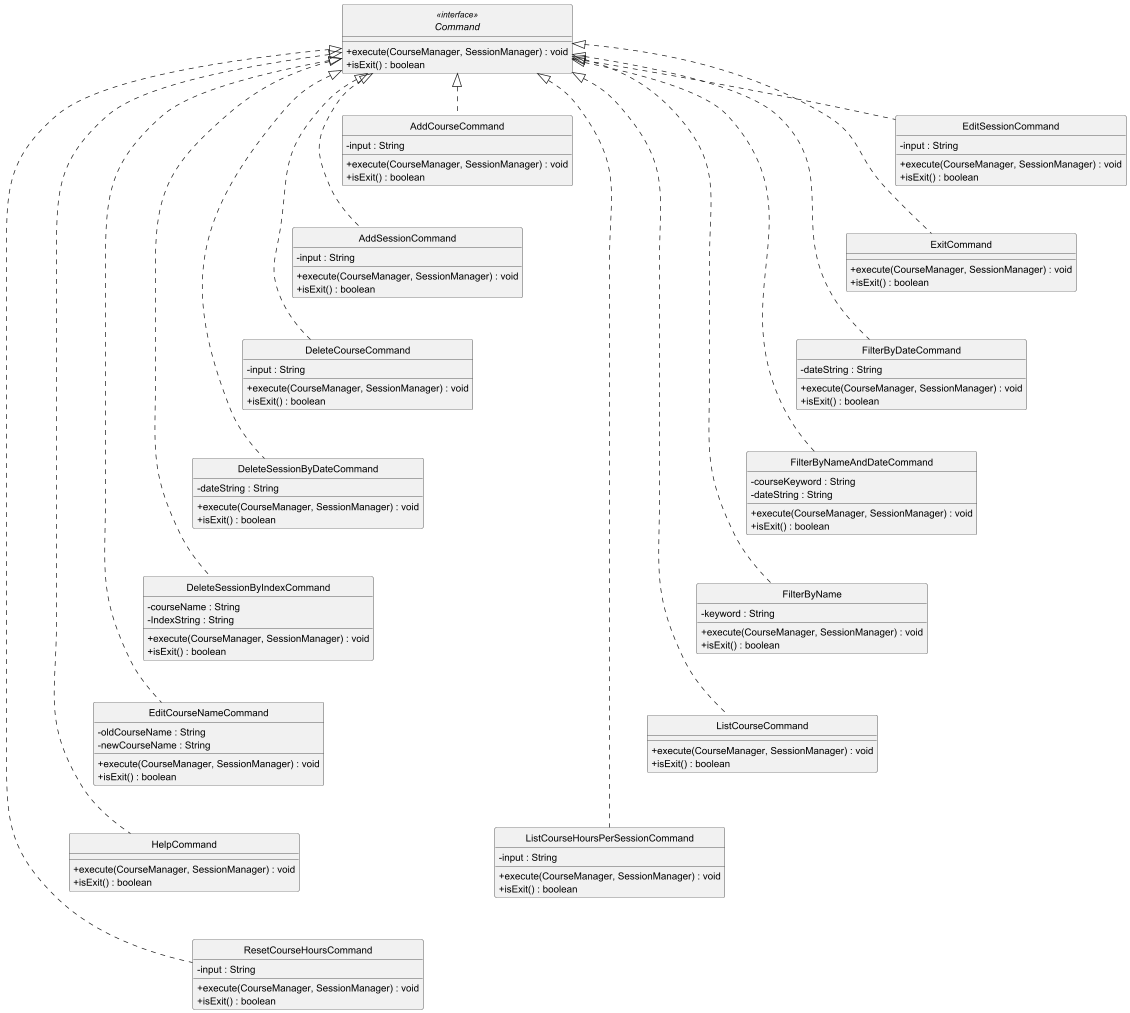
The Command interface is implemented by the following command classes:
- Add Commands:
AddCourseCommand,AddSessionCommand - Delete Commands:
DeleteCourseCommand,DeleteSessionByDateCommand,DeleteSessionByIndexCommand - Edit Commands:
EditCourseNameCommand,EditSessionCommand - List Commands:
ListCourseCommand,ListCourseHoursPerSessionCommand - Filter Commands:
FilterByDateCommand,FilterByNameAndDateCommand,FilterByNameCommand - Other Commands:
ResetCourseHoursCommand,ExitCommand,HelpCommand
Methods
The Command interface defines the following methods:
execute(CourseManager courses, SessionManager sessions): Executes the specific command logic. Takes the course and session managers as parameters to perform operations. ThrowsNUStudyExceptionif execution fails.isExit(): Returns a boolean indicating whether the command is an exit command.
The following sections provide detailed examples of specific command implementations to illustrate how the Command
interface is used in practice.
List course command
Overview
ListCourseCommand is a concrete implementation of the Command interface that lists all courses managed by
CourseManager. It performs basic sanity checks, logs its actions, and delegates the rendering of the course list to
UserInterface.
Implementation details
- Package:
arpa.home.nustudy.command - Class:
public class ListCourseCommand implements Command
Dependencies:
| Component | Responsibility |
|---|---|
CourseManager |
Provides the collection of courses to be listed. |
SessionManager |
Present for consistency with command signature. |
UserInterface |
Renders the course list or an appropriate message. |
NUStudyException |
Thrown if listing fails (not expected in current impl). |
Logger |
Records info/fine level logs for tracing execution. |
Workflow
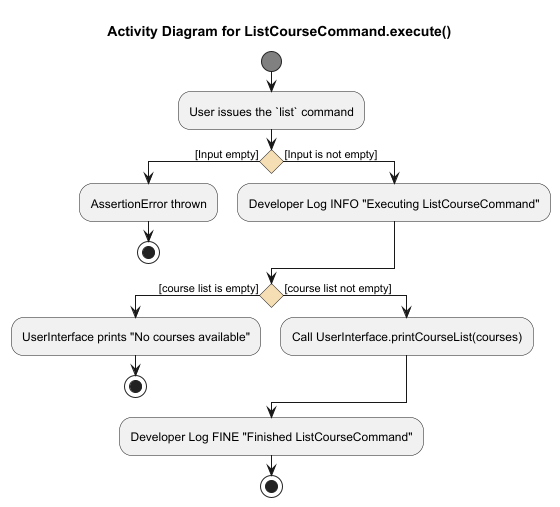
The activity diagram below illustrates the ListCourseCommand.execute() flow:
Key steps:
- Assert non-null arguments (both
coursesandsessions) to catch programming errors early. - Log the start of command execution at INFO level.
- If the course list is empty, prompt the user with “No courses available” and stop.
- Otherwise, invoke
UserInterface.printCourseList(courses)to render the list. - Log completion at FINE level and return.
Notes:
- The assertions are defensive checks intended for development/testing (enabled with
-ea). Production callers should ensure valid arguments.
Delete course command
Overview
DeleteCourseCommand is a concrete implementation of the Command interface in the NUStudy system. The primary
function is to handle user requests to delete an existing course by its name from the courses ArrayList managed by
the CourseManager.
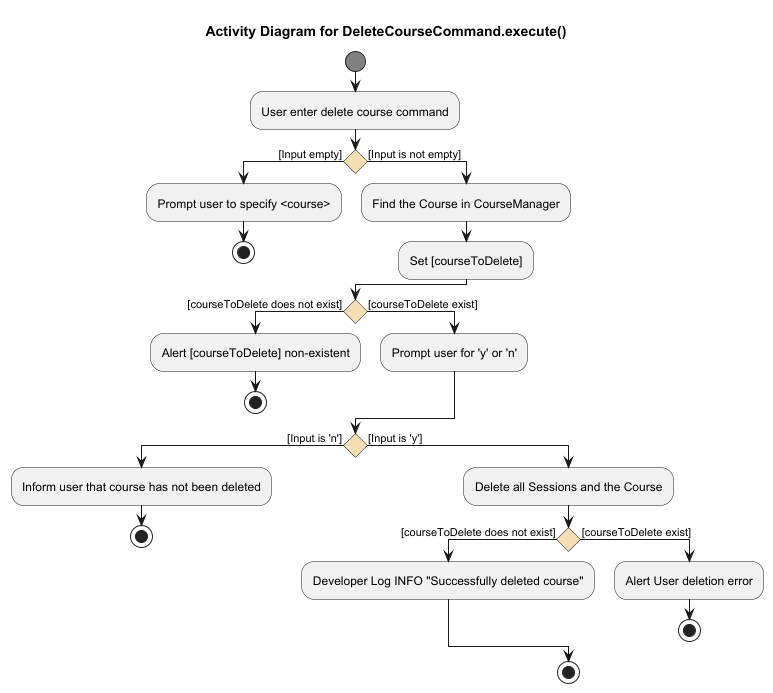
This command does the following:
- Validate the user input
- Searches for the specified course
- Removes it and sessions if exist from the internal course list if found
- Performs consistency checks post-deletion
- Logs all major steps and errors for traceability
- Displays a confirmation message to the user
Implementation details
- Package:
arpa.home.nustudy.command - Class:
public class DeleteCourseCommand implements Command
Dependencies:
| Component | Responsibility |
|---|---|
CourseManager |
Manages the list of existing courses, including lookup and deletion. |
SessionManager |
Provided for command consistency, though not used directly in this class. |
UserInterface |
Displays confirmation messages to the user. |
Storage |
Used as a reference for the logger name. |
NUStudyException |
Thrown for invalid inputs or deletion failures. |
NUStudyNoSuchCourseException |
Thrown when the specified course does not exist. |
Logger |
Provides runtime logging for debug, info, and error tracking. |
Workflow
The following activity diagram illustrates the complete removing course workflow:
Course component
Overview
The course component is responsible for representing and managing course-related entities in the NUStudy application.
It consists of 2 main classes:
Course— a class that encapsulates all information about a Course.CourseManager— a class that manipulates and maintains a collection of Course objects.
These 2 classes forms the layer for handling the entity of Course. It is responsible for the CRUD of the entity Course.
Implementation details
The following diagram is the class diagram for Course and CourseManger:
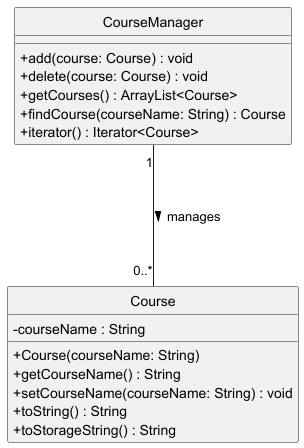
The CourseManager class acts as a controller or manager, handling a dynamic list of Course instances using an internal
ArrayList.
Course methods:
The Course class defines the following methods:
Course(String courseName): Constructs a new Course with the given code.getCourseName(): Retrieves the course code attribute of a Course.setCourseName(String courseName): Updates the course code of a Course used for the edit feature.toString(): Returns the course code as a readable string.toStorageString(): Returns the course data formatted for file storage.
CourseManager methods:
The CourseManager class defines the following methods:
add(Course course): Adds a Course Object to the list.delete(Course course): Removes a Course Object from the list.getCourses(): Retrieves all courses managed by this class.findCourse(String courseName): Searches for a course by name.iterator(): Returns an iterator to traverse through all courses.
Session component
Overview
The session component is responsible for representing a study session, and managing the list of existing study sessions.
It consists of 2 main classes:
Session— responsible for representing a study session, which consists of the study session’s logged hours, the course studied, and the date of the study sessionSessionManager— responsible for managing the list of existing study sessions, and contains helper methods to query the list of existing study sessions
Implementation details
The following is the class diagram for Session and SessionManager:
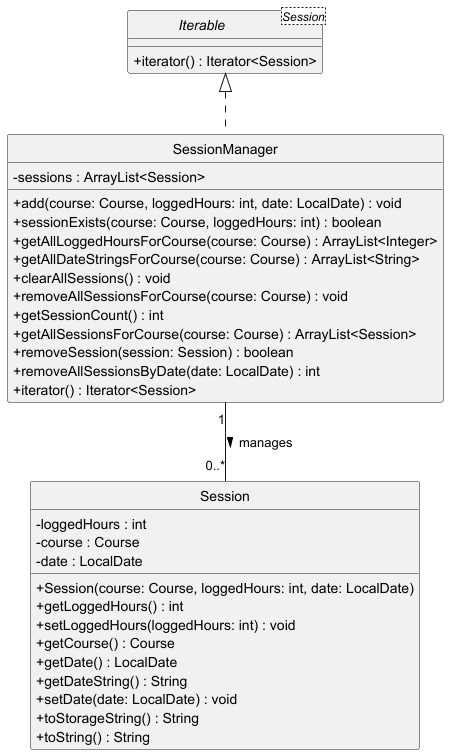
The SessionManager class acts as a controller or manager, keeping track of a dynamic list of Session instances
using an internal ArrayList.
Session methods:
The Session class defines the following methods:
Session(Course course, int loggedHours, LocalDate date): Create a new Session for the specified course codegetLoggedHours(): Get logged hours for this sessionsetLoggedHours(int loggedHours): Set logged hours for this sessiongetCourse(): Get course for this sessiongetDate(): Return the date of the sessiongetDateString(): Return a formatted string representation of the datesetDate(LocalDate date): Set the date of the sessiontoStorageString(): Return a string representation to be stored in the data filetoString(): Return a string representation of the course and/or session
SessionManager methods:
The SessionManager class defines the following methods:
add(Course course, int loggedHours, LocalDate date): Add a study session to the list of study sessionssessionExists(Course course, int loggedHours): Return true if the given course and logged hours exist in the list of study sessionsgetAllLoggedHoursForCourse(Course course): Get a list of all logged hours for a specific coursegetAllDateStringsForCourse(Course course): Get a list of all dates for a specific courseclearAllSessions(): Clear all study sessions regardless of course from study session listremoveAllSessionsForCourse(Course course): Remove all study sessions associated with the given coursegetSessionCount(): Return the number of sessions in the study session listgetAllSessionsForCourse(Course course): Get a list of all study sessions for a specific courseremoveSession(Session session): Remove a specified session from the study session listremoveAllSessionsByDate(LocalDate date): Remove all study sessions on a specified dateiterator(): Return an iterator to the list of study sessions
Storage component
Overview
The Storage class is responsible for managing the saving and loading of Course and Study Session to and from the
local machine. NUStudy will load the saved data from the saved txt file if present when starting the application, and
saving all data back to the saved txt file when application exits.
Implementation details
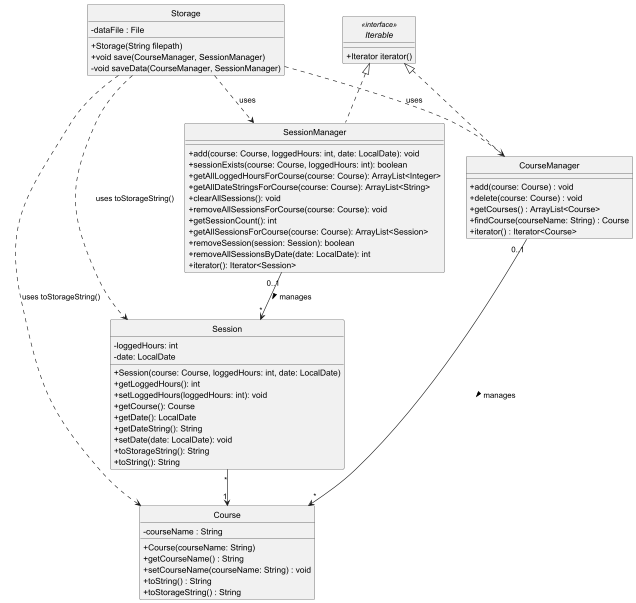
The Storage component consists of the following key classes:
Storage— Main class that handles file I/O operations for saving and loading dataCourse— Represent a course with a name, provides serialisation viatoStorageString()Session— Represents a study session linked to a course with logged hours, provides serialisation viatoStorageString()CourseManager— Manages the collection of coursesSessionManager— Manages the collection of study sessions
The class diagram below illustrates the relationships between these classes:
File format and conventions
Storage creates a NUStudy.txt in the directory ./data when the application first run and performs a save
operation. Subsequent runs of the application will load data from this file.
The storage file is lined-based, with each line representing a single record:
Format:
C	<courseName>
S	<courseName>	<loggedHours>
Where:
Cprefix denotes a Course recordSprefix denotes a Session record- Fields are separated by the tab character
\t <courseName>is the course identifier<loggedHours>is an integer representing study hours
Examples:
C	CS2113
C	MA1508E
S	MA1508E	6	2025-10-31
S	CS2113	2	2025-10-31
S	CS2113	5	2025-10-31
This example shows:
- Two courses: CS2113 and MA1508E
- Three study sessions: two for CS2113 (2 hours and 5 hours) and one for MA1508E (6 hours)
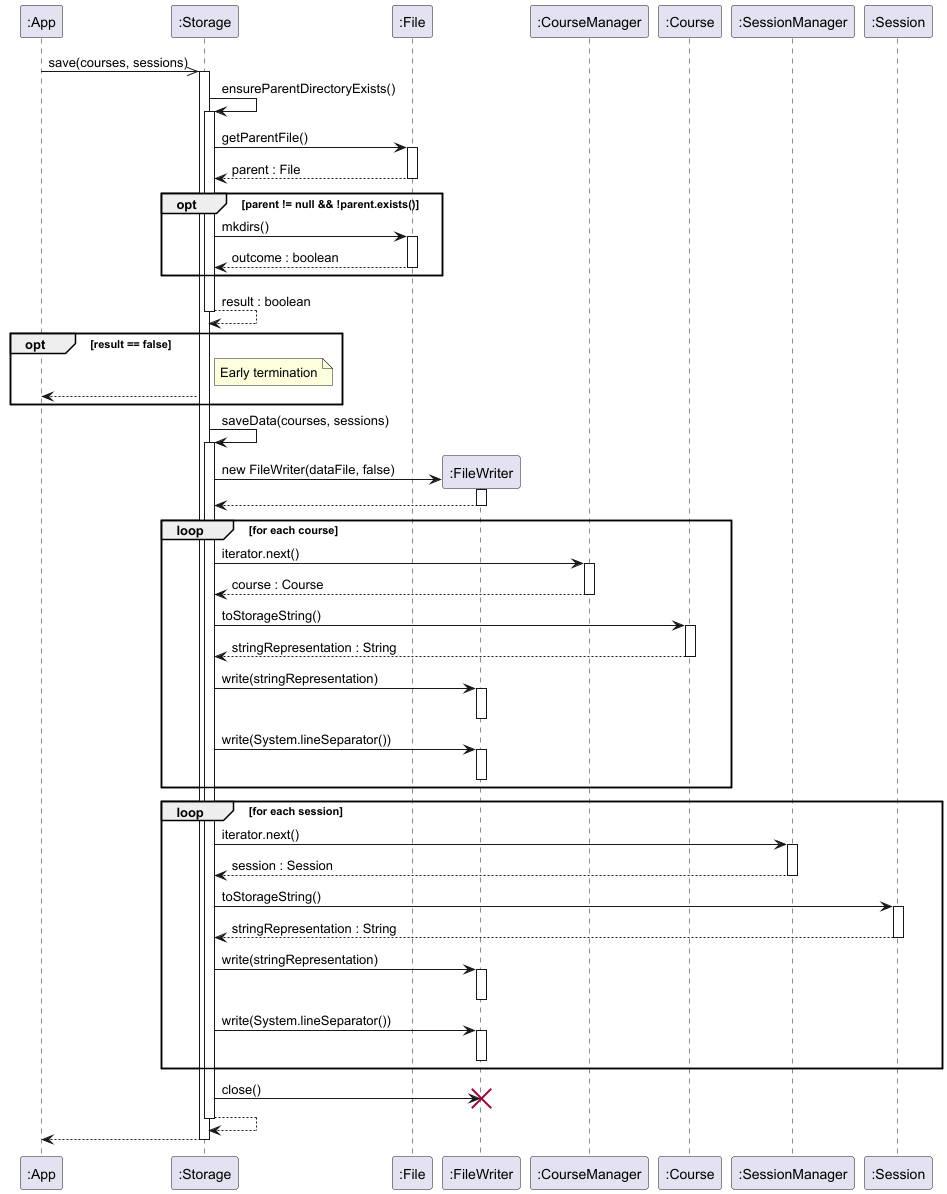
Save operation
The following sequence diagram illustrates how data is stored to storage:
Load operation
The following sequence diagrams illustrate how data is loaded from storage:
- Main load process: Checks for existence of parent directory and text file, creates buffer and handles continuous reading in of stored data lines from the text file.
- Parsing sub-process: Abstracted frame
sd parsing courses or sessionsshowcases how each line is interpreted and converted intoCourseorSessionobjects.
Main load sequence diagram for data loading:
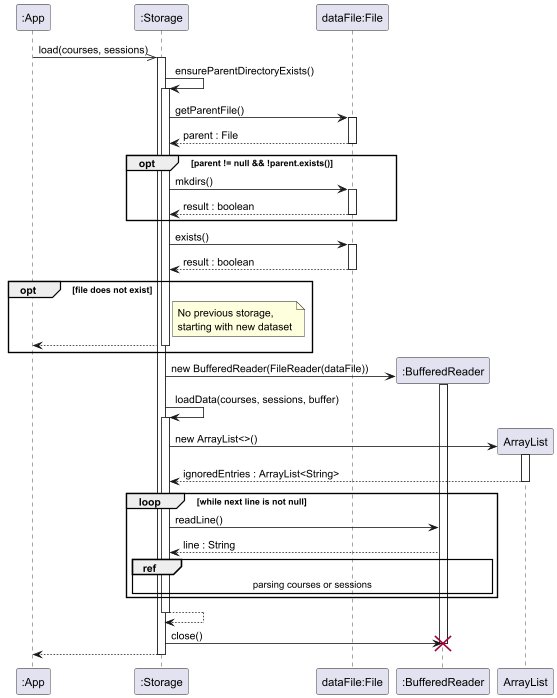
The load(courses, sessions) method in Storage executes the following:
ensureParentDirectoryexists()checks for the parent directory. If non-existent, it attempts to create one usingmkdirs().- If parent directory exists, the existence of the storage file
NUStudy.txtis checked. If it is non-existent, a note is logged to notify user and empty managers are initialised. - A
BufferedReaderis initiailsed to read in contents from the text file line by line. - An
ArrayList<String>object is initialised to collect all ignored entries which will be later displayed to the user for refrence. - Each line from the file is handed over to a separate sub-process (see below). This sub-process handles checks,
SessionorCourseobject creation and insertion into the respective managers. - After all lines are processed, the
BufferedReaderis closed and returns toApp.
Referenced sequence diagram for parsing logic:
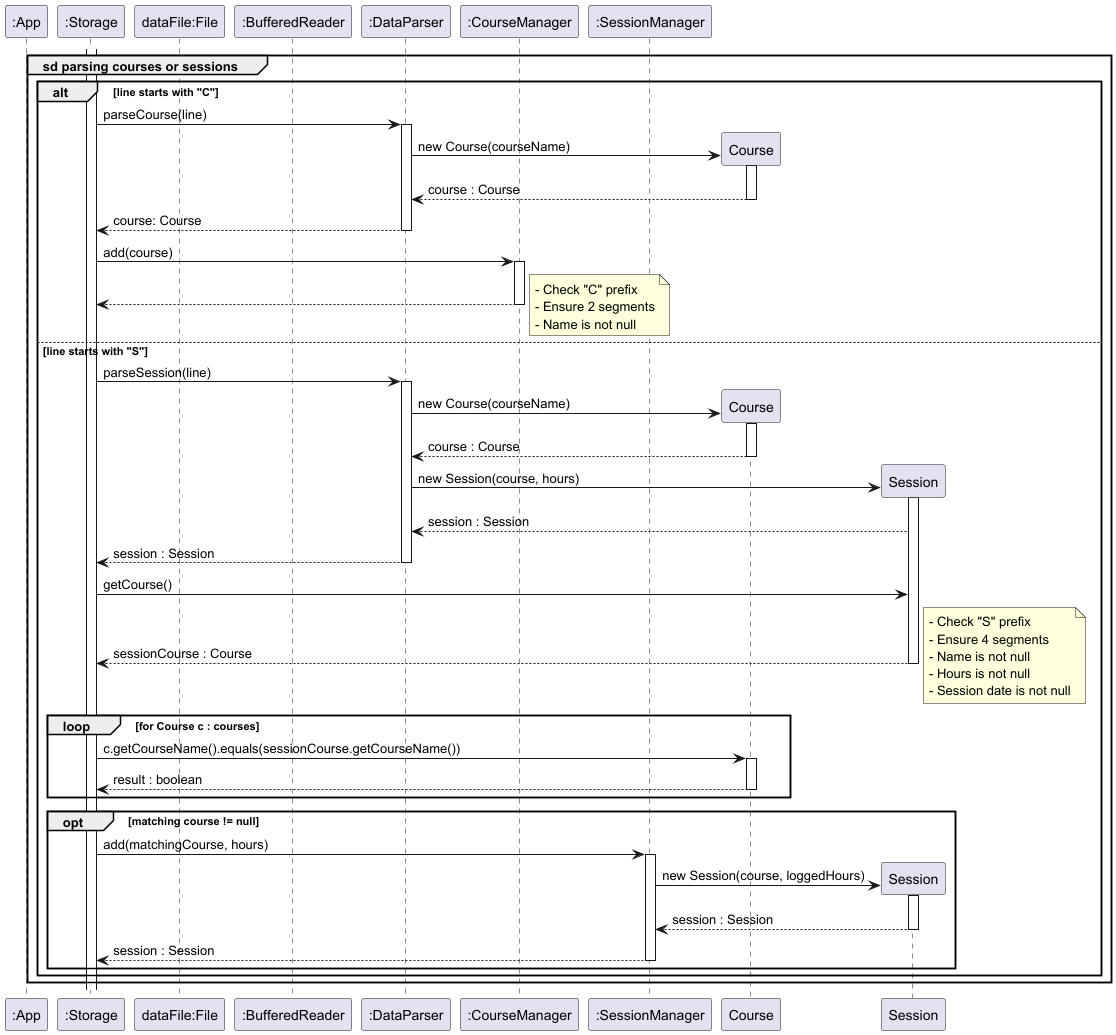
The abstracted logic parsing frame executes the following:
- Based on the line prefix, the
Storagecomponent assigns parsing logic as shown by theoptframe.- If a line starts with
C, it callsparseCourse(line)through theDataParserclass, constructs a newCourseobject and inserts it into theCourseManagerinstance. - If a line starts with
S, it callsparseSession(line)through theDataParserclass, constructs a newSessionobject with its correspondingCoursereference and inserts it into theSessionManagerinstance if a matching course already exists.
- If a line starts with
- Each parsing branch contains internal validation checks for prefix correctness, segment counts and null checks.
Data integrity and safety
NUStudy includes a built-in data validation to protect against corrupted or manually modified storage files.
Validation checks
The following validations are performed on each line during load:
- Manual modification: lines using whitespaces instead of
\t(TAB) are flagged as manually injected data - Duplicate course: Course entries that already exist in the system are identified
- Formatting: Lines must match the expected format (prefix, filed count, data types)
- Date: Session dates must be valid (supported formats in User Guide, eg: ‘DD/MM/YYYY’) and must not be in the future — any date strictly after the system’s current date will be rejected
- Course reference: Sessions must reference existing courses
- Character set: User input fields are restricted to English alphanumeric characters (A–Z, a–z, 0–9). Course codes are
allowed to include symbols (for example
-,_,/) for flexibility
Handling invalid entries
The following is executed when invalid entries are detected:
- The entry is skipped and not loaded into the system
- The problematic line and specific reason are recorded
- A warning is logged for debugging purposes
- Loading continues with remaining valid entries
Reset component
Overview
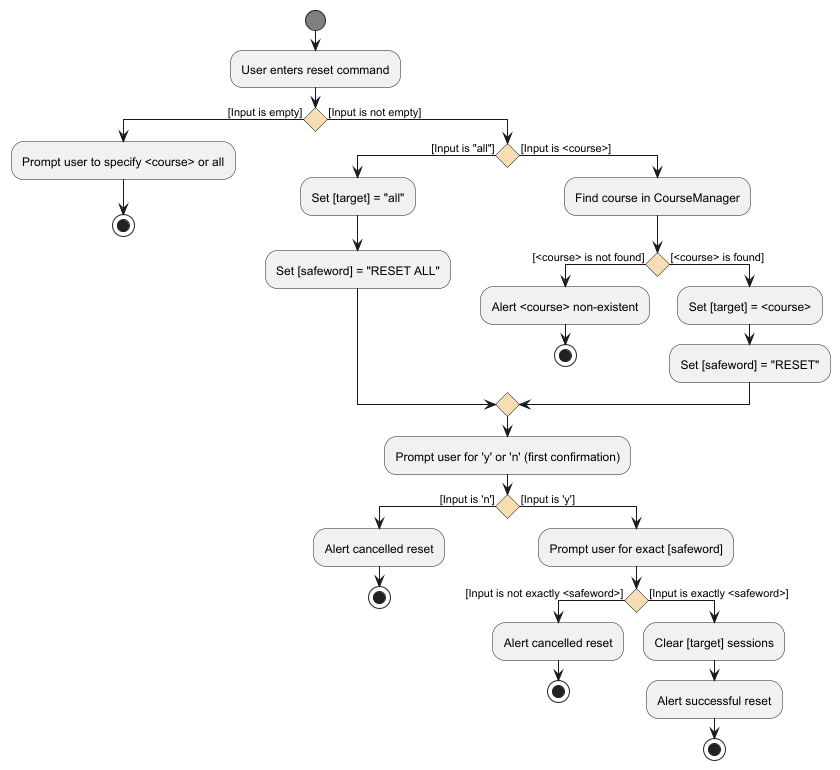
The reset functionality enables users to clear logged study hours for either all or a specified course. A double confirmation flow is developed to prevent any unintended and thus, accidental deletions.
Implementation details
- First level confirmation:
- Users must confirm with
yornregardless of capitalisation. This prompt loops until valid input is received - If
nis received, reset operation is cancelled
- Users must confirm with
- Second level confirmation:
- Users are to prompted to type the
safeword—RESET ALLfor all courses andRESETfor a specific course - The
safewordmust strictly be equivalent, else reset operation is cancelled
- Users are to prompted to type the
Reset workflow
The following activity diagram illustrates the complete reset workflow:
Design considerations
Aspect: Confirmation mechanism
- Alternative 1 (current choice): Dual-level confirmation with
safeword- Pros: By strictly requiring the user to clarify his/her final intent, this ensures maximum prevention in accidental deletion
- Cons: Slower user experience due to increased user interaction
- Alternative 2: Single-level confirmation
- Pros: Quicker user experience, straightforward design
- Cons: Greater risk of accidental data wipe, especially for
reset allusage
- Alternative 3: Zero confirmation
- Pros: Quickest operation, minimal required user interaction
- Cons: Reckless design, leading to unacceptable risk of data wipe
Exception component
Overview
The exception component package defines a proper hierarchy of custom exceptions used across the NUStudy application
to handle various error conditions gracefully. All exceptions in this package inherit from base class
NUStudyException, which extends the internal Java Exception class.
Implementation details
| Class Name | Description |
|---|---|
NUStudyException(String message) |
Base class for all custom exceptions in NUStudy. |
FutureDateException(String message) |
Thrown when a provided date is in the future. |
NUStudyCommandException(String message) |
Handles invalid or unrecognized user commands. |
NUStudyCourseAlreadyExistException(String message) |
Raised when trying to add a course that already exists. |
NUStudyNoSuchSessionException() |
Thrown when the user enters an invalid or nonexistent session ID. |
WrongDateFormatException(String message) |
Raised when a user inputs an invalid date or unsupported format. |
Design Considerations
- Hierarchy-based error handling: All exceptions extend from a common parent, allowing centralised error handling.
- Providing better clarity: Each exception class focuses on a specific, well-defined error condition.
- User Guidance: Error messages are crafted to guide users toward valid input or actions.
Appendix: Requirements
Product scope
Target user profile
- Prefer desktop apps over other types
- Can type fast
- Prefers typing to mouse interactions
- Is reasonably comfortable using CLI apps
- Undergraduate students who want a simple, keyboard-driven tool to track study time per course
- Teaching assistants / tutors who inspect or maintain small course logs
- Single-user administrators managing personal or small-group study records
- Intended for small-to-moderate datasets (tens to low hundreds of courses/sessions)
Value proposition
Helps students to track their study hours for each course, see gaps and understand what courses to focus on next. Students often struggle to manage study time across multiple courses, leading to missed deadlines. Existing tools can be distracting, requiring internet access, or bloated with unnecessary features.
User stories
Priorities: High (must have) - * * *, Medium (nice to have) - * *, Low (optional) - *
| Priority | As a… | I want to… | So that I can… |
|---|---|---|---|
* * * |
Organised student | add a new course | track number of hours required for it |
* * * |
Organised student | log study time spent for a specific course | keep track of the amount of time spent studying per module |
* * * |
Organised student | remove a course | keep my study list relevant |
* * * |
Visual learner | be given proper feedback as I manipulate stuff (CRUD) | be visually stimulated and be informed of my actions |
* * * |
Organised student | reset logged hours | know what to focus on next |
Use cases
UC1 — Add course (MSS)
- User issues:
add <course> - System validates and adds course
- System confirms addition;
listshows it
Extensions: missing/invalid input → system prompts; duplicate (case-insensitive) → system rejects
UC2 — Add study session (MSS)
- User issues:
add <course>oradd <course> <hours>oradd <course> <hours> <date> - System validates course existence, hours, and date if specified
- System records session and confirms
Extensions: invalid course/date/hours → system shows error
UC3 — List courses / sessions (MSS)
- User issues:
listorlist <course> - System displays courses or sessions with 1-based indices
Extensions: no data → empty message
UC4 — Edit session (MSS)
- User issues:
edit <course> <index> <hours>oredit <course> <index> <date> - System validates inputs and updates session
- System confirms update
Extensions: invalid course/index/date → system shows error
UC5 — Filter (MSS)
- User issues:
filter <course>orfilter <date>orfilter <course> <date> - System validates inputs and displays matching results
- System retains original course/session indices in output to support subsequent edit/delete by index
Extensions: invalid/ future dates → informative error; no matches → empty message
UC6 — Reset hours (MSS)
- User issues:
reset <course>orreset all - Two-stage confirmation (y/n, then safeword)
- On confirmation, system resets hours and confirms
Non-functional requirements
Data
- NFR1: Persist data across sessions to local file; no data loss on normal shutdown
- NFR2: Handle typical dataset sizes (hundreds of entries) with responsive performance
Environment
- NFR3: Run on mainstream OSes with Java 17+
Usability & accessibility
- NFR4: Clear, actionable error messages for invalid input (dates, indices, missing args)
- NFR5: Keyboard-first UX; minimal typing overhead for common tasks
Maintainability & testability
- NFR6: Modular design (parser, UI, commands, managers) to ease maintenance
Reliability & robustness
- NFR7: Fail gracefully on malformed storage lines (log and skip), validate dates (reject future dates) and indices
Performance
- NFR8: Typical command response time under 2 seconds for up to hundreds of records
Scalability
- NFR9: Design permits scaling storage or migrating to DB if needed (out-of-scope for MVP)
Glossary
- Mainstream OS: Windows, Linux, Unix, MacOS
- MSS: Must-Support Scenario
- NUStudy: The name of the application
- CLI: Command-Line Interface
- Course: A study subject identified by a course code (e.g., CS2113, MA1511)
- Session: A recorded study period linked to a Course, with logged hours and a date
- Index (course): 1-based position of a course in the CourseManager’s list (used for edit/delete)
- Index (session): 1-based position of a session in a course’s session list (used for edit/delete)
- Future date: A date strictly after the system’s current date; commands validate and report this
- Safeword: Exact confirmation string required for destructive operations (e.g.,
RESET,RESET ALL)
Appendix: Instructions for manual testing
Technical requirements:
- Ensure you have Java 17+ installed on your computer. If you do not have JRE 17 installed, you can download Temurin JRE 17.
Manual testing of features
Please refer to the User Guide for the full list of features and instructions on how to use them.
JUnit testing
JUnit tests are provided for core components of NUStudy. To run the tests, follow these steps:
- Open a terminal and navigate to the root directory of the project
- Run the following command to execute the tests:
- On Windows:
./gradlew.bat test - On macOS/Linux:
./gradlew test
- On Windows:
- Review the test results in the terminal output